Curriculum
HTML5 and CSS from Zero to Hero
Welcome to the course and objectives
0/3


Web development context
0/3

Environment setup
0/3

Introduction to HTML5 and CSS
0/5

HTML5 Elements and Structure
0/4
Advanced HTML5 Elements
0/3
Basic CSS Styling
0/3
CSS Box Model and Layout
0/4
Advanced CSS Layouts
0/3
CSS Styling for Interactivity
0/3
HTML5 APIs
0/3
HTML5 Local Storage and Web Storage
0/3
Responsive web design
0/3
Advanced CSS techniques
0/3
Putting it All Together and Best Practices
0/3
New HTML5 Structural Elements
Understanding the Basic Structure of an HTML5 Document
HTML5 introduced a more semantic approach to structuring web content, making it easier for developers to create organized, accessible, and SEO-friendly websites. Below is an overview of the basic structure of an HTML5 document and the importance of key semantic tags like <header>, <footer>, and <nav>.
- Basic Structure of an HTML5 Document.- An HTML5 document typically begins with the following structure
- The Importance of Semantic Tags.- HTML5 introduced a set of semantic tags that provide meaning to the structure of a document. These tags improve both the accessibility and SEO of a web page by clearly defining the roles of different content sections.
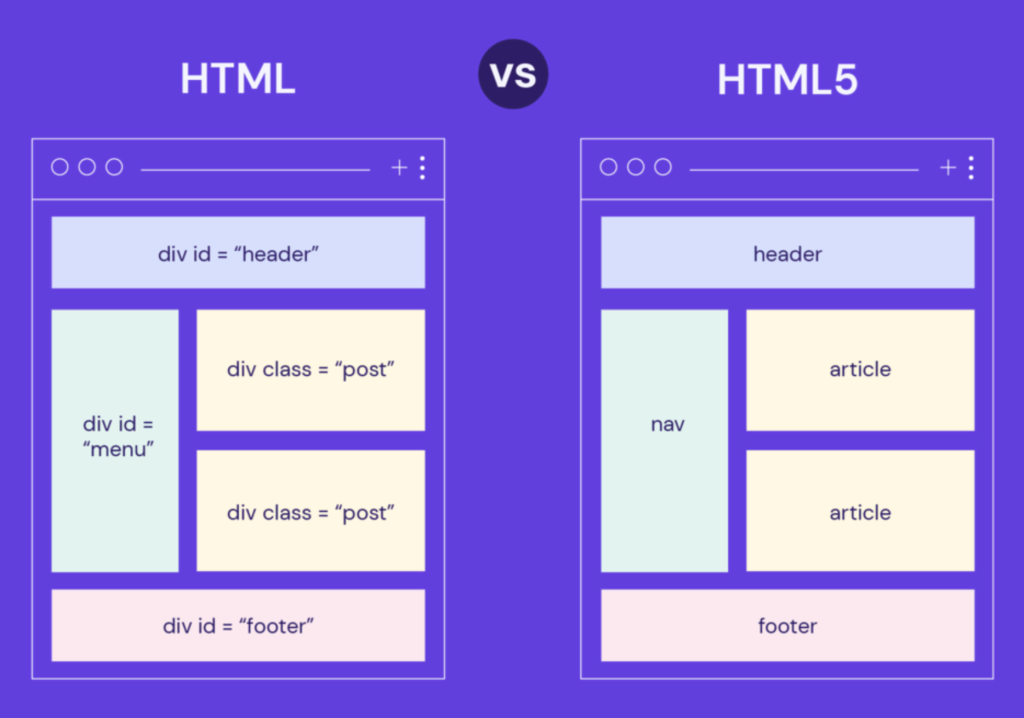
The <header> tag represents the introductory content or a set of navigational links. It typically contains one or more heading elements (<h1>–<h6>), a logo, a search form, and possibly an author name
Advantages:
- Semantic Clarity: Clearly indicates that the content is introductory or related to the main navigation.
- Accessibility: Screen readers and other assistive technologies can better interpret the content within
<header>. - SEO Benefits: Search engines can better understand the structure of the page, improving the SEO ranking.
The <footer> tag represents the footer of a document or section. It often contains information about the author, copyright data, links to terms of service, privacy policy, or any other concluding content.
Advantages:
- Semantic Organization: Makes it clear that the content is related to the conclusion or the bottom of the page/section.
- Accessibility: Assistive technologies can easily navigate to the footer content.
- Consistent Design: Helps in maintaining a consistent layout across different pages.
The <nav> tag is used to define a set of navigation links. It is typically used for the main navigation menu but can be used for other navigation links as well.
Advantages:
- Semantic Navigation: Clearly indicates that the content is navigational, helping both users and search engines.
- Improved SEO: Search engines can index navigation links more effectively.
- Accessibility: Screen readers can easily identify navigation areas, providing users with shortcuts to navigate through the site.
The <main> tag specifies the main content of a document. This content is unique to the document and is not repeated across multiple pages.
Advantages:
- Content Prioritization: Helps screen readers skip repetitive content and go directly to the main content.
- SEO Enhancement: Search engines understand that the content within
<main>is the primary focus, improving content indexing. - Semantic Structure: Organizes the page structure logically, separating the main content from headers, footers, and sidebars.
The <article> tag is used to represent a self-contained piece of content that could be independently distributed or reused, such as a blog post, news story, or forum post.
Advantages:
- Content Reusability: Makes it easy to syndicate or repurpose content across different platforms.
- SEO Benefits: Search engines can treat the content within
<article>as an independent piece, potentially improving its visibility. - Semantic Independence: Helps to clearly define content that stands alone, improving readability and structure.
The <section> tag defines a section in a document, usually with a thematic grouping of content, typically with a heading. It is often used to break down content into smaller, logically related parts.
Advantages:
- Improved Structure: Helps in logically grouping content, making the document more organized and easier to navigate.
- SEO and Accessibility: Assists search engines and screen readers in understanding the page’s layout and content hierarchy.
- Flexible Usage: Can be used within articles, pages, or other containers to create distinct sections.
So, remember that HTML elements don’t need a dot for CSS styling because of how CSS selectors are designed to differentiate between different types of elements and attributes:
-
Element Selectors:
When you target an HTML element directly in CSS, such asdiv,p, orheader, you’re using an element selector. No special symbol like a dot (.) is needed because you’re selecting all instances of that specific element type on the page.-
p { color: blue; }
-
- Class Selectors:
CSS uses a dot (.) to select elements by class. The dot indicates that you’re targeting an element with a specific class attribute, regardless of the element type. This allows for more flexible styling, as multiple elements can share the same class.-
.highlight { background-color: yellow; }
-
- ID Selectors: CSS uses a hash (
#) for selecting elements by their unique ID. IDs are unique within the document, so the hash symbol clearly indicates that you’re targeting a single, specific element.-
#main-heading { font-size: 2em; }
-
Why No Dot for Element Selectors?
The lack of a dot for element selectors keeps the syntax clean and easy to read. It’s a way to directly reference the HTML elements themselves without additional symbols, making it clear that the styles apply to all elements of that type. The dot and hash are reserved for more specific and flexible targeting using classes and IDs, respectively.
Benefits of using <section> and <article>
Benefits of Using <section>:
-
Semantic Organization:
- The
<section>tag helps group related content into distinct sections, making the document’s structure clearer. This is especially useful in complex web pages where content needs to be divided into logical parts.
- The
-
Improved Accessibility:
- Assistive technologies, like screen readers, can better navigate and interpret the content when it is organized into sections. This enhances the user experience for individuals with disabilities.
-
Content Hierarchy:
- The
<section>tag allows for the creation of a well-defined content hierarchy, especially when used with headings (<h1>–<h6>). This hierarchy helps both users and search engines understand the importance and relationships between different parts of the content.
- The
-
Flexibility:
<section>can be used within other elements like<article>,<aside>, or even within another<section>, offering flexibility in how content is organized and presented.
Benefits of Using <article>:
-
Self-Contained Content:
- The
<article>tag represents a self-contained piece of content that could be independently distributed or syndicated. This makes it ideal for blog posts, news articles, forum posts, or any other content that stands alone.
- The
-
Enhanced SEO:
- Search engines treat the content within an
<article>as an independent unit, which can improve the visibility of that specific piece of content. It can help search engines better index and rank the content.
- Search engines treat the content within an
-
Content Reusability:
- Because
<article>encapsulates a complete and independent piece of content, it can be easily reused, syndicated, or shared across different platforms without losing its context or meaning.
- Because
-
Clear Content Boundaries:
- The use of
<article>clearly defines the boundaries of a piece of content, making it easier for developers and content creators to manage and style specific parts of a webpage.
- The use of
Shared Benefits:
- Semantic Clarity:
- Both tags add meaning to the document’s structure, making it easier for developers to read and maintain the code. They also help browsers, search engines, and assistive technologies interpret the content more accurately.
- Consistency Across Projects:
- Using these semantic tags promotes consistency across different projects, as developers can rely on a common understanding of what
<section>and<article>represent.
- Using these semantic tags promotes consistency across different projects, as developers can rely on a common understanding of what
In summary, <section> and <article> tags contribute to a more organized, accessible, and search-engine-friendly HTML structure, enhancing both user experience and content management.
Using a frontend tool like the HTML5 Outliner (found at https://gsnedders.html5.org/outliner/) provides several benefits, particularly when working with the semantic structure of an HTML5 document. Here’s how such a tool can be advantageous:
1. Visualizing Document Structure:
- The HTML5 Outliner helps you visualize the outline of your HTML document based on the semantic structure, showing the hierarchy of headings and sections. This gives you a clear understanding of how content is organized and how it will be interpreted by browsers, search engines, and assistive technologies.
2. Improving Accessibility:
- By using the outliner, you can identify potential issues in the document structure that might affect accessibility. It allows you to ensure that sections and headings are properly nested and ordered, making it easier for screen readers to navigate the content.
3. Enhancing SEO:
- A well-structured document outline contributes to better SEO performance. Search engines use the semantic structure to understand the importance and relationships between different parts of the content. The outliner helps you optimize this structure, potentially improving your page’s search rankings.
4. Ensuring Proper Use of Semantic Elements:
- The outliner can help you verify that you’re using semantic HTML5 elements (
<header>,<footer>,<nav>,<main>,<article>,<section>, etc.) correctly. It flags any misuse or incorrect nesting, allowing you to refine your markup for better clarity and structure.
5. Saving Time in Debugging and Development:
- Instead of manually reviewing your HTML to check the structure, the outliner provides an automated way to assess the document. This saves time during development and debugging, especially in larger projects where the structure can become complex.
6. Educational Value:
- For those learning HTML5, the outliner serves as an educational tool to understand how different HTML5 tags influence the document’s outline. It provides immediate feedback on the impact of adding or changing elements, helping to build a deeper understanding of HTML5 semantics.
7. Consistency Across Projects:
- Using the outliner helps maintain a consistent approach to structuring HTML documents across different projects. This is particularly useful in team environments where multiple developers need to follow the same structural conventions.
8. Optimizing for Content Management Systems (CMS):
- If you’re developing content for a CMS, the outliner can help ensure that the HTML generated by the CMS maintains a clear and logical structure. This is crucial for content-heavy sites where structure plays a key role in content delivery and user experience.
Lesson Materials
