Curriculum
HTML5 and CSS from Zero to Hero
Welcome to the course and objectives
0/3


Web development context
0/3

Environment setup
0/3

Introduction to HTML5 and CSS
0/5

HTML5 Elements and Structure
0/4
Advanced HTML5 Elements
0/3
Basic CSS Styling
0/3
CSS Box Model and Layout
0/4
Advanced CSS Layouts
0/3
CSS Styling for Interactivity
0/3
HTML5 APIs
0/3
HTML5 Local Storage and Web Storage
0/3
Responsive web design
0/3
Advanced CSS techniques
0/3
Putting it All Together and Best Practices
0/3
HTML Overview
When you view a website, your web browser receives HTML and CSS files from a web server. A web server is a specialized computer located somewhere in the world that stores and delivers websites to users.
Your web browser, a special software application you can install on your computer, interprets the HTML, CSS and JavaScript code to create the webpage you see. This process involves rendering the text, images, and other elements (web assets) according to the instructions in the code. Rendering is the process of turning code into interactive web content that users can view.
Throughout this course, we will learn how to prepare these web assets for use on the web and how to insert them into your webpages to create rich, engaging user experiences. By understanding these basics, you’ll be better equipped to build effective and visually appealing websites.
It’s important to understand some concepts related with web development performance:
Web Server
The location of a web hosting server plays a crucial role in determining the performance and user experience of a website. Here are several reasons why a web hosting server’s location matters:
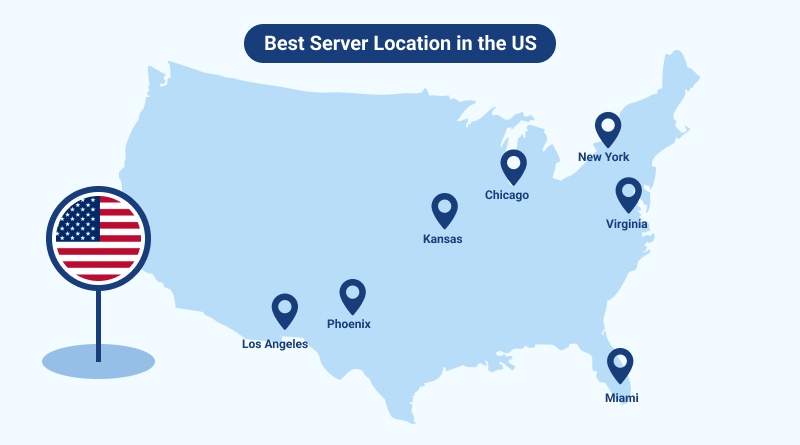
Latency and Load Times: The physical distance between a user and the server affects the latency or the time it takes for data to travel between the user’s device and the server. A server located closer to the user reduces latency, resulting in faster load times for web pages and a smoother browsing experience.
Search Engine Optimization (SEO): Search engines take server location into account when ranking websites. For websites targeting a specific geographic audience, hosting the server in the same region can positively impact local search rankings. This is particularly important for businesses with a regional focus.
Data Privacy and Compliance: Certain industries and regions have specific data privacy regulations and compliance requirements. Hosting your server in a location that aligns with these regulations ensures that you adhere to data protection laws and maintain the privacy and security of user data.
Redundancy and Failover: Web hosting providers often have multiple data centers in different geographic locations. This geographic diversity allows for redundancy and failover capabilities. If one server or data center experiences issues, traffic can be rerouted to another location, minimizing downtime and ensuring continuous website availability.
Content Delivery: For websites with global audiences, strategically placing servers in different locations allows for efficient content delivery. Content Delivery Networks (CDNs) distribute content across multiple servers, ensuring that users around the world can access website resources quickly by serving content from a server nearest to them.
Legal and Regulatory Considerations: Different countries have varying legal and regulatory environments. Hosting your server in a specific location may be subject to the laws of that jurisdiction. Understanding and complying with these legal considerations is essential for the smooth operation of your website.
Connecting to the web server
- When you connect to the web, you consume an Internet Service Provider (ISP), you type a domain name or web address in order to visit a site
- Your computer contacts a Domain Name System or (DNS) in order to find the IP address associated with the requested domain name
- The IP address returned from the DNS allows the browser to access the web server on it’s specific ip address
In a web browser, the documents you interact with are the webpages themselves, including their addresses and inner pages. Just like any other type of document, a clear structure is crucial for helping readers understand the content and navigate effectively. Therefore, learning how to structure web documents is fundamental to creating effective webpages.
We will begin by exploring how HTML defines the structure of a webpage. You’ll learn how to use HTML tags, also known as elements, to organize and present content. By mastering these foundational skills, you’ll be able to create well-structured and easily navigable webpages.